Login with Ultimate Multiplayer Lobby
Ultimate Multiplayer Lobby provides a simple and easy-to-use interface for integrating a login system into your game. This guide will walk you through the process of integrating a login system into your Unreal Engine 5 project.
Prerequisites & Important Notes
- You need either EOS or Steam setup in your project.
- You do not need to do anything for most of the cases, as UML automatically handles the login process.
Configuration with Steam
Both steam plugin options automatically login the player when the game starts, which means you don't need to do anything to make it work. You can still bind to responses like LoginCompleted etc to get the login status and run your own logic.
Configuration with EIK
Doing auto-login with EIK is pretty simple. You just need to set the Auto Login option to a valid value in the EOS Integration Kit Settings under Project Settings.
- For Packaged Builds:

- For Editor:

AutoLogin with EIK (opens in a new tab)
Configuration with EOS or other systems
If you look under the Functions Override in HUD_Lobby (Child of UML_HUD_Lobby), you will see bunch of functios that you can override to add your own logic.
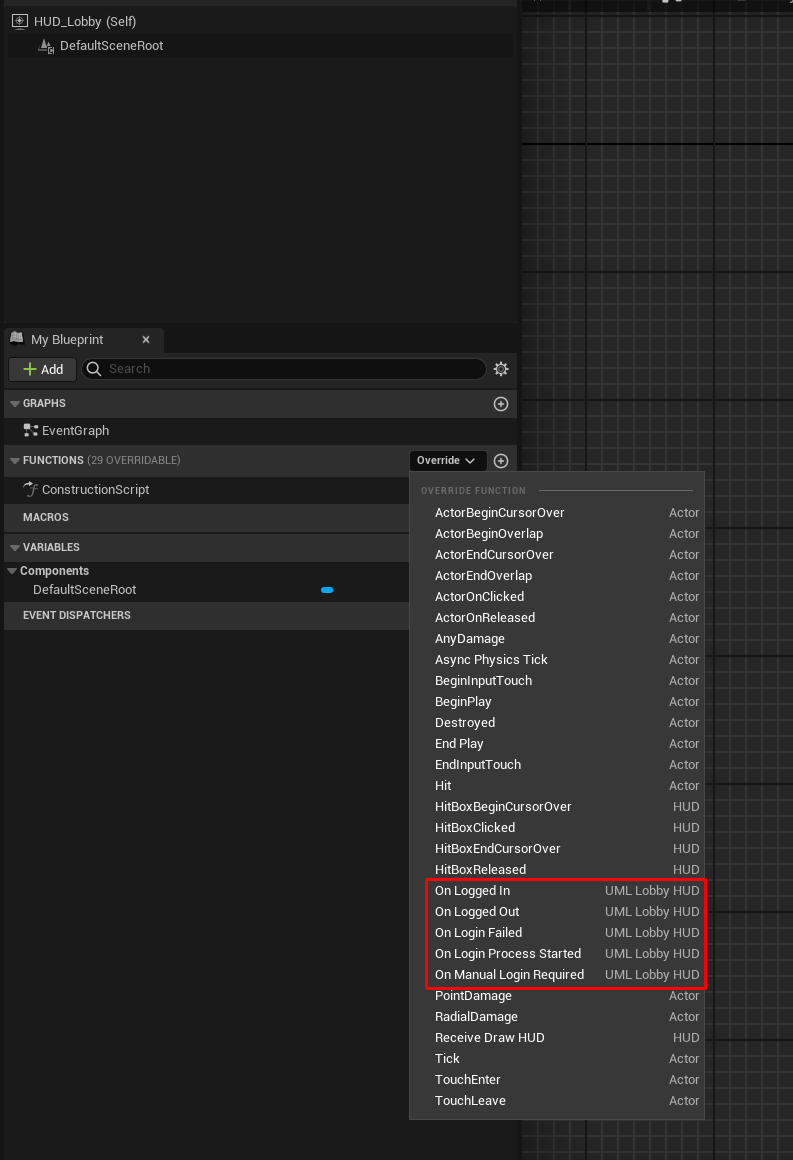
You can override most of these logics to add your own login system.
Login Completed
Once, you finish the manual login process, UML should automatically finish the login, as it checks every 2 seconds if the user is logged in or not.